Default carrier
As of May 2026, FedEx is our default carrier because it supports shipments up to 70 kg (versus 50 kg for DHL). You can, however, choose to set DHL as the default carrier for all of your orders.
How to change your default carrier :
- Go to your Account settings.
- Click on Order and Delivery.
- In the pop-up window, click on the pencil icon in the upper-right corner to modify your preference.

Carrier change for a specific order
If you need to temporarily change the carrier for a specific order (such as a direct shipment to your customer), this update will only affect the current order.
2 methods for changing your carrier
Changing via the Order Details section
- Once your parts have been added to the cart, click "Checkout now" to proceed to the "Review you order" step.
- Click the "Change" button in the shipping information section to choose another carrier.


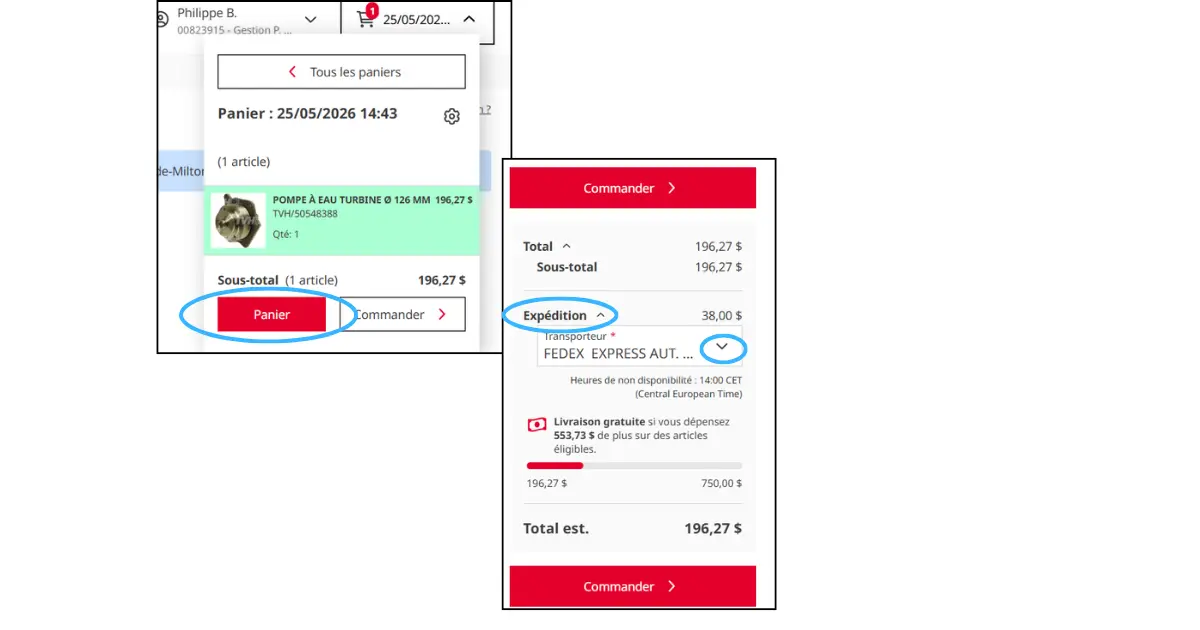
Change via the shopping cart
- After adding your parts to the shopping cart, click on «View cart»
- In the order summary block, you can update the carrier under the «Shipping» section.